How to Optimize Your Minecraft Server for Maximum Performance
Cut lag on your Minecraft server: switch to Paper in one click, tune view and simulation distance, pre-generate your world with Chunky, find lag with spark and schedule daily restarts. Step-by-step in the PLAYERTICK panel.

Nothing kills a Minecraft server faster than lag. Rubber-banding, blocks that reappear after you break them, and mobs that freeze in place are all signs the server can't keep up with its 20 ticks per second.
The good news is that most lag comes from a handful of causes, and you can fix nearly all of them from the PLAYERTICK panel in about 15 minutes. This guide goes through them in order of impact.
Prerequisites
- A Minecraft Java server. You can view our plans here.
- A backup. You can make one from the Backups page before you change anything.
Step 1 - Switch to Paper by installing Chunky
New Minecraft servers run the vanilla server software from Mojang. Paper is a drop-in replacement that runs the same worlds far more efficiently, fixes a long list of lag issues, and lets you install plugins. For almost every non-modded server, switching is the single biggest improvement you can make.
You don't have to switch by hand. Installing any plugin switches your server to Paper automatically, so we'll do both at once with Chunky, a plugin we'll use in Step 3 to pre-generate your world.
If you run mods, skip this guide's plugin steps: mods need Forge or Fabric instead (see our guide to installing mods).
- Take a backup from Backups, just in case.
- Click Plugins under Game Features.
- Search for
chunkyand click View on Chunky (Bukkit), the one listed under World Generators.
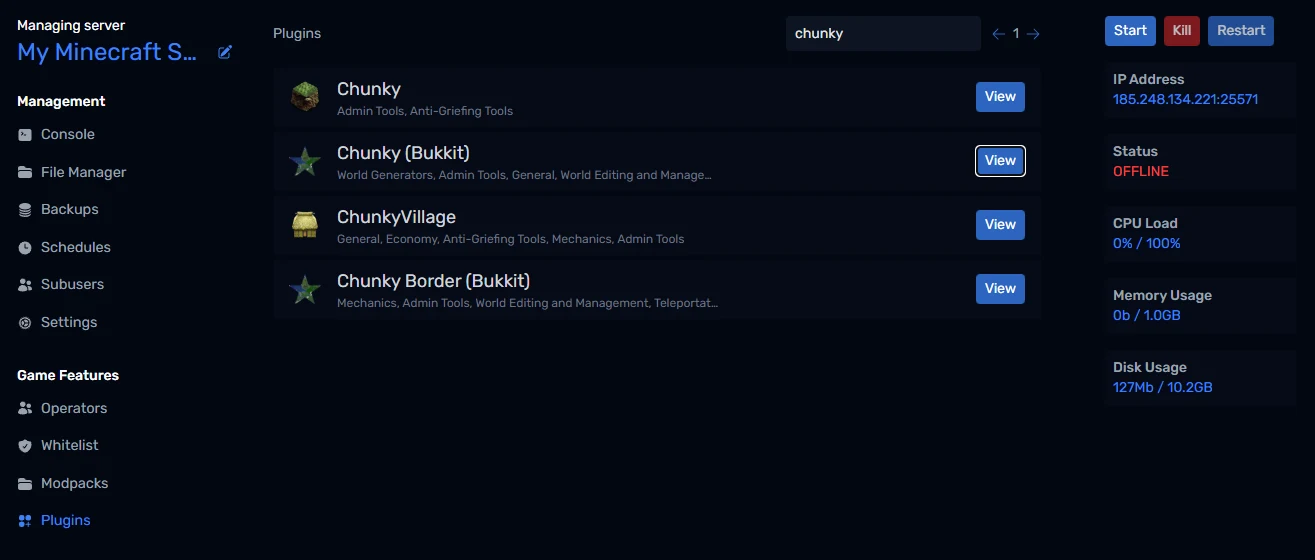
- Pick the version that matches your Minecraft version and click Install.
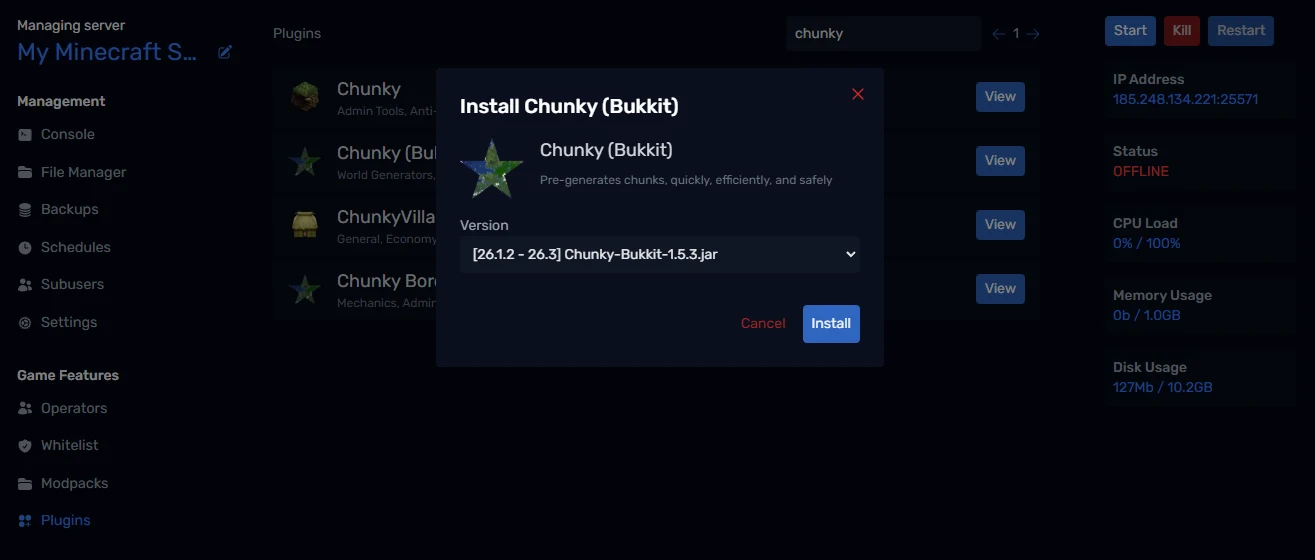
Because your server is still on vanilla, the panel tells you it's switching it to Paper:
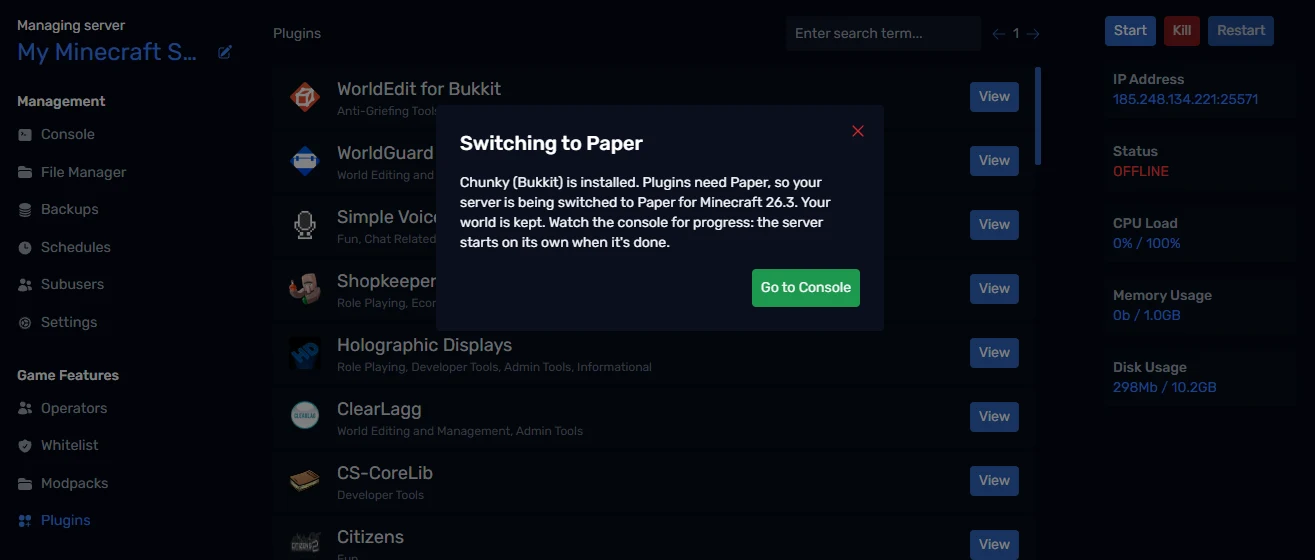
The switch keeps your world and uses Paper for the same Minecraft version your world already runs, so nothing gets upgraded behind your back. The old vanilla jar is kept as server.jar.old in case you ever want it back.
Click Go to Console to watch. The server restarts on its own when the switch is done, and Paper prints a welcome message and a link to its documentation the first time it starts:
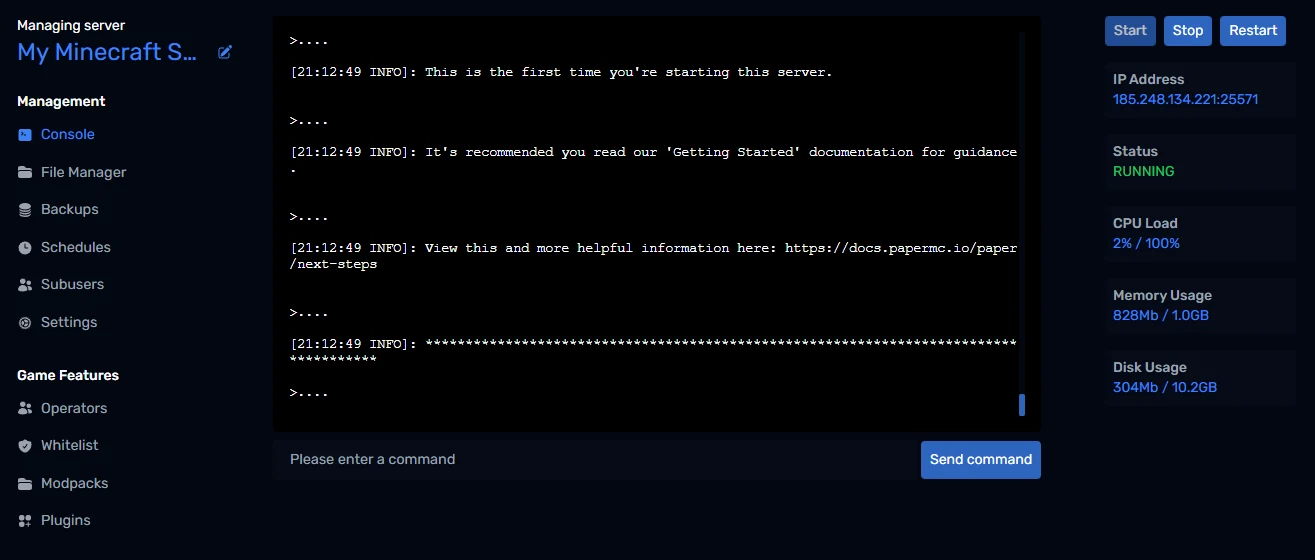
Paper creates a few new config files alongside server.properties, such as bukkit.yml, spigot.yml and a config folder. Their defaults are already well tuned, so you don't need to touch them to see a big improvement.
Step 2 - Lower view and simulation distance
These two settings control how much of the world the server keeps loaded around each player, and they have a huge effect on performance.
- Stop the server.
- In File Manager, click
server.propertiesto open it in the editor. - Find and change these lines:
view-distance=8
simulation-distance=6
- Click Save (or press Ctrl+S), then start the server.
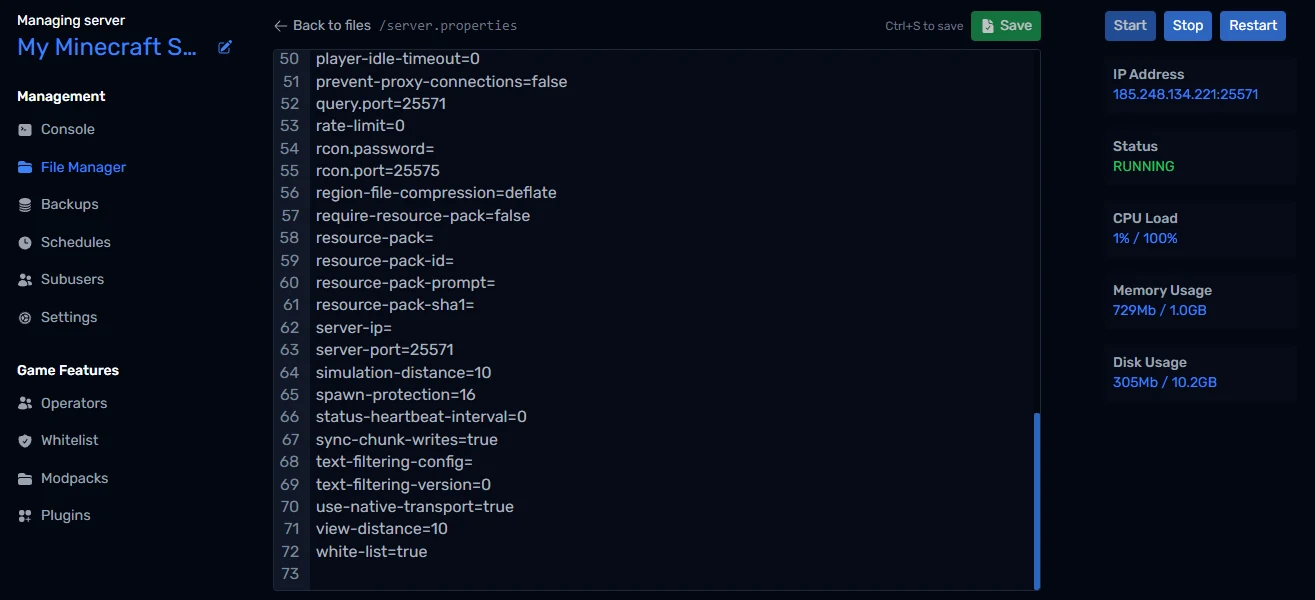
- view-distance is how far away players can see chunks. It's sent to players but costs less than simulation.
- simulation-distance is how far away the world actually runs: crops grow, mobs move and redstone ticks. It's the more expensive of the two.
The default for both is 10. Dropping simulation distance to 6 cuts the number of active chunks per player by more than half, and most players won't notice. On a busy server, try 6 and 4.
Step 3 - Pre-generate your world with Chunky
Generating new chunks is one of the most expensive things a server does. When players explore fresh land, the server has to generate it on the spot, which causes lag spikes for everyone. Chunky generates the world ahead of time, so exploring only has to load chunks, which is much cheaper.
You installed Chunky in Step 1. Open Console and run:
chunky radius 3000
chunky start
That generates everything within 3,000 blocks of spawn. Chunky reports its progress in the console, and you can stop it any time with chunky pause and carry on later with chunky continue.
Pre-generating uses a lot of CPU while it runs, so do it when nobody is playing, for example overnight. Pair it with a world border (worldborder set 6000 in the console) so players can't wander beyond the pre-generated area.
Step 4 - Find out what's causing lag with spark
If you still have lag after the steps above, measure it rather than guess. Paper comes with spark, a profiler that shows exactly what's using up each tick.
In the Console, run:
spark tps
This shows your ticks per second (20 is perfect) and how long each tick takes (under 50ms is healthy). To see what is slow:
spark profiler start
Wait a few minutes while the lag happens, then run:
spark profiler stop
spark gives you a link to a report in your browser. Look at the biggest entries: common culprits are huge mob farms, hoppers, item entities on the ground, and a single heavy plugin.
Step 5 - Schedule a daily restart
A daily restart clears out memory and keeps long-running servers feeling fresh. Set one up on the Schedules page:
- Click Schedules in the left-hand menu, then Add Schedule.
- Name it "Daily restart", choose Run every x days, set Days between runs to
1, and pick a Start date at a quiet time, such as 5am. - Click Create Schedule, then click the pencil icon next to your new schedule.
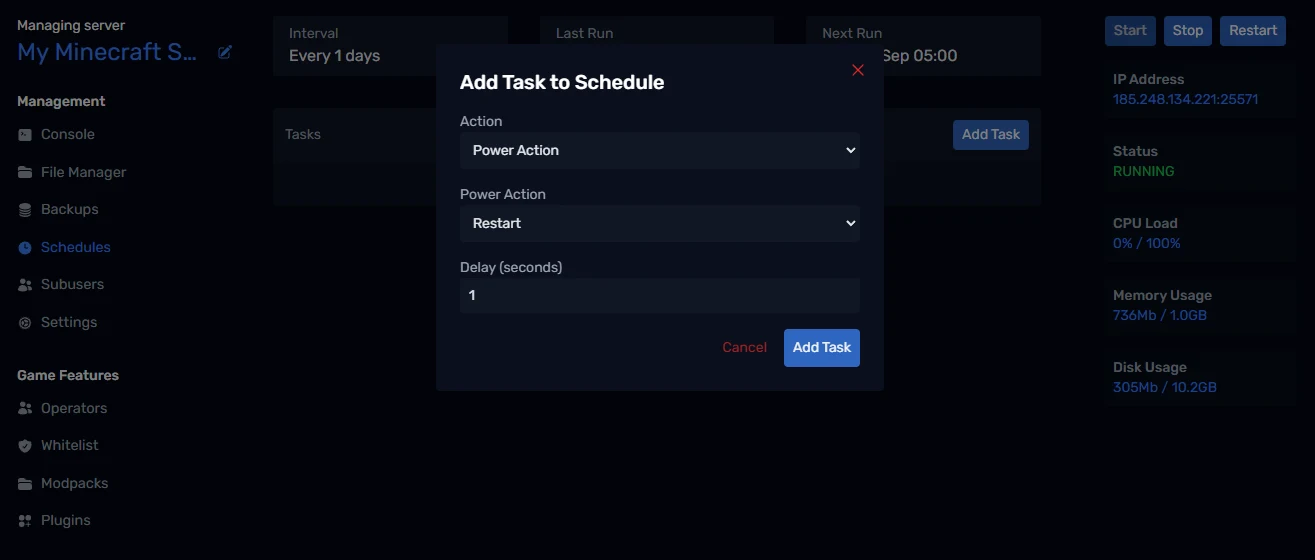
- Click Add Task, set Action to Power Action and Power Action to Restart, and click Add Task.
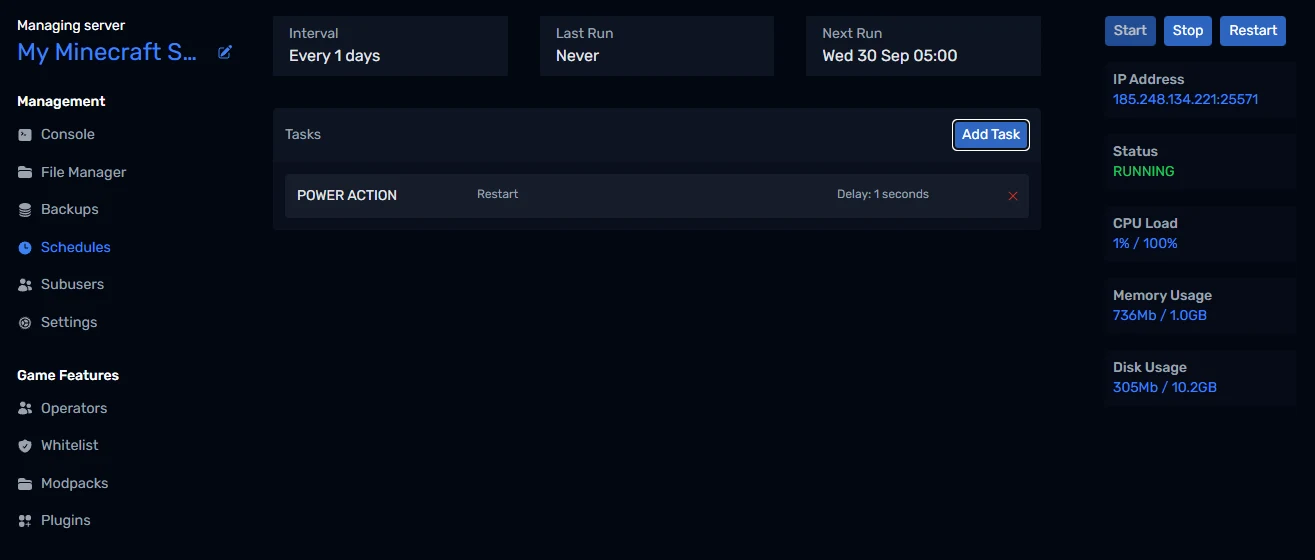
To warn players first, add a Send Command task before the restart, such as say Server restarting in 1 minute, and give the restart task a Delay (seconds) of 60.
Step 6 - Check your memory and Java version
The tiles on the right of every panel page show your server's CPU Load and Memory Usage live.
- If Memory Usage sits close to your limit, your plan is too small for your world or player count. You can upgrade from Settings.
- More RAM isn't always better. If memory use is well below your limit but you still have lag, the cause is almost always CPU work, such as entities, redstone and chunk generation, which the steps above address.
- Use a modern Java. Under Settings, Runtime Version should be the newest version your Minecraft version supports. Newer Java versions have faster garbage collection.
Wrapping up
That's it: Paper, sensible distances, a pre-generated world, a profiler for when things go wrong, and a daily restart. Together they take care of the vast majority of Minecraft lag. If you get stuck, reach out to us on Discord or through support.