How to Set Up Automatic Wipes on Your Rust Server
Schedule weekly, bi-weekly, monthly or force wipes on your Rust server, choose whether to wipe blueprints, and set a new map seed, all from the PLAYERTICK Autowipe page.
Wipes are part of what makes Rust, well, Rust. A fresh map brings players back, levels the playing field and keeps your population healthy. Doing it by hand means stopping the server, deleting the right save files at the right time, and remembering to change the seed. Miss a force wipe and your server won't even start on the new version.
Every PLAYERTICK Rust server comes with an Autowipe page that does all of that for you on a schedule. This guide walks you through setting one up.
Prerequisites
- A Rust server. You can view our plans here.
- A rough idea of your wipe schedule. If you're not sure, see Choosing a wipe schedule below.
Map wipes vs blueprint wipes
There are two kinds of wipe, and you can choose each one separately:
| Wipe type | What gets reset | Files removed |
|---|---|---|
| Map wipe | The world: bases, loot, deployables, and players' inventories and positions | proceduralmap.* save files |
| Blueprint (BP) wipe | Everything players have learned | player.* data files |
A full wipe is both at once. Most community servers map wipe every week or two and only wipe blueprints monthly, so players keep some progress between map wipes.
Choosing a wipe schedule
The Autowipe page offers four intervals:
- Weekly: popular with high-population and "solo/duo/trio" servers where bases get raided quickly.
- Bi-weekly: a good middle ground for most community servers.
- Monthly: suits casual, PvE and low-population servers.
- On Force Wipe: runs on the first Thursday of each month, when Facepunch releases the monthly update.
The monthly update always forces a map wipe, because old maps don't load on the new version. Even if you pick weekly or bi-weekly, it's worth adding an On Force Wipe entry as well, so you're never caught out.
Step 1 - Open the Autowipe page
- Log in to the client area and open your Rust server.
- In the left-hand menu, under Game Features, click Autowipe.
- Click Create Wipe in the top right.
Step 2 - Configure the wipe
The Create Auto-Wipe window asks for a few things:
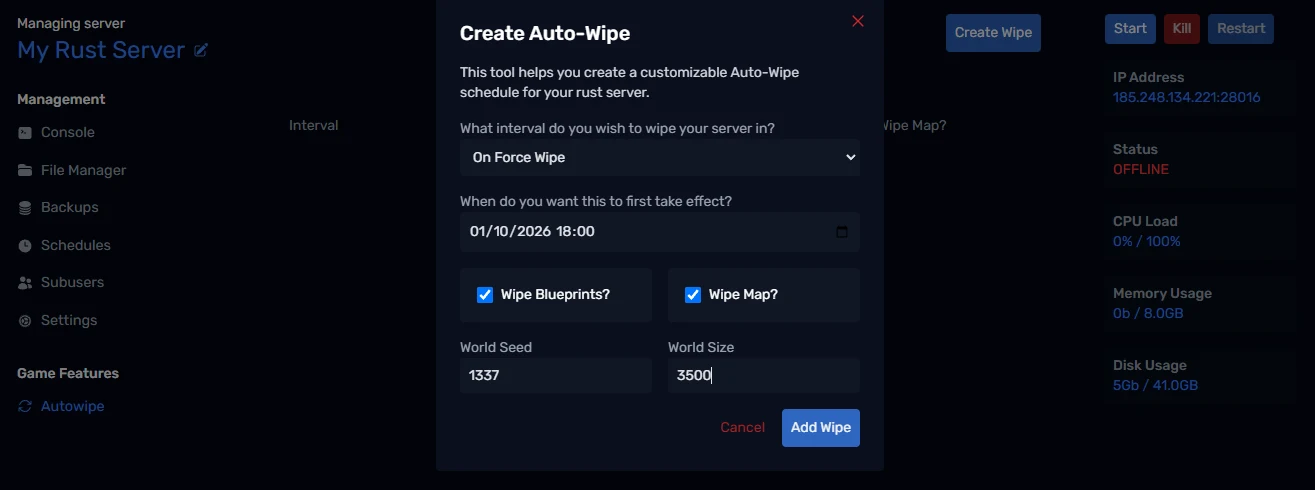
- What interval do you wish to wipe your server in? Pick Weekly, Bi-weekly, Monthly or On Force Wipe.
- When do you want this to first take effect? The date and time of the first wipe. Every later wipe repeats from this point. Choosing On Force Wipe fills this in for you with the first Thursday of next month.
- Wipe Blueprints? Tick this for a BP wipe.
- Wipe Map? Tick this for a map wipe. Ticking it shows two more options:
- World Seed: the number that generates your procedural map. Enter a new number to get a new map layout each wipe, or leave it blank to keep the current seed.
- World Size: the map size in metres. Smaller maps (around 3000 to 3500) feel busier on low-population servers; larger maps suit big populations. Leave it blank to keep the current size.
Double-check the start time, because the schedule repeats from it. Facepunch pushes the monthly update on the first Thursday, usually in the evening UK time, so set your force wipe for shortly after the update is out.
Click Add Wipe when you're happy.
Step 3 - Check the schedule
Your wipe now appears in the list, showing its Interval, when it Last Run, the Next Run time, and whether it wipes blueprints and the map.
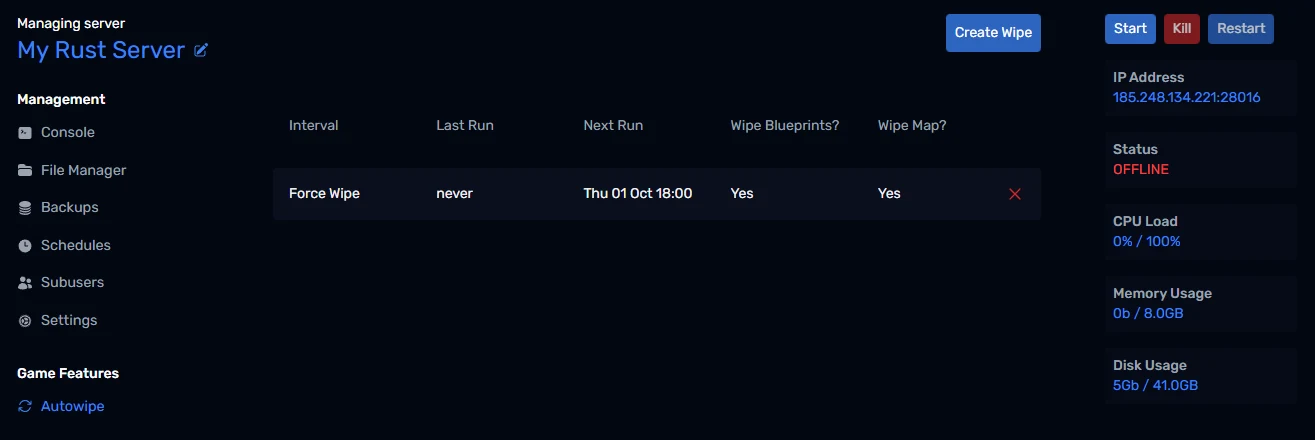
You can add more than one wipe. A common setup is:
- A Weekly map-only wipe every Thursday evening.
- An On Force Wipe entry with both Wipe Map and Wipe Blueprints ticked.
To remove a wipe, click the red × at the end of its row.
What happens during a wipe
When a wipe is due, PLAYERTICK:
- Warns players in-game at 15, 10, 5 and 1 minutes before the wipe, so nobody is caught mid-raid.
- Stops the server.
- Deletes the map save files, the blueprint data, or both, depending on your settings.
- Applies your new World Seed and World Size, if you set them.
- Starts the server again on a fresh map.
The first boot after a map wipe takes a few minutes longer than usual while Rust generates the new map. That's normal.
Tips for a smooth wipe day
- Announce your schedule. Put your wipe day in your server name or description, for example "Wiped Thursdays". Players search the server browser for fresh wipes.
- Take a backup first. Wipes delete save files for good. If you want to keep the old map, create a backup from the Backups page before the wipe runs.
- Use a new seed on force wipes. Players get bored of the same map. Picking a fresh seed each month is an easy way to keep things interesting.
Wrapping up
That's it: your Rust server now wipes itself on schedule, warns your players first, and comes back up on a fresh map. If you get stuck, reach out to us on Discord or through support.